Examples
Simple example
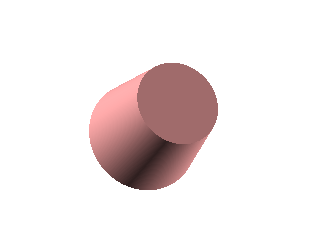
Simple example tool.
Example: Simple example tool.

Simple tool example.
from pcsg import tool
from pcsg import animation
from pcsg import solid


# Create a new example tool
class SimpleExample (tool.Tool):
    """
    Simple example tool.
    """
    def __init__ (self):
        super ().__init__ (
            name =          "Simple example",
            description =   "Most simple example tool."
        )


    def attributes (self):
        """
        Set camera.
        """
        return super ().attributes ().override ({
            'camera.view': (0, 0, 0, 20, -20, 0, 30)
        })


    def scene (self, attributes):
        """
        Build example scene.
        """
        return solid.Cylinder (
            height = 5,
            radius1 = 3,
            radius2 = 2,
            attributes = ({
                'material': (0.9, 0.6, 0.6)
            })
        )


# Run as command line tool
if __name__ == "__main__":
    SimpleExample ().run ()
Gear animation
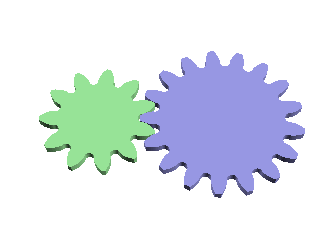
Example gear wheel animation.
Example: Example gear wheel animation.

The gear animation example is a command line tool for rendering an animation and creating 3D printable gear parts.
import math
from pcsg import tree
from pcsg import tool
from pcsg import transform
from pcsg import animation
from pcsg.construction import gear


# Create a new example tool
class GearExample (tool.Tool):
    """
    Example gear wheel animation.
    """
    def __init__ (self):
        super ().__init__ (
            name =          "Gear wheel example",
            description =   "An example application "
                            "showing some gear wheels."
        )

        # add animation for camera
        self.addAnimation (
            animation.Animation (
                'camera',
                (0, 0, 0, 30, 0, 0, 70)
            ). \
            path (3, (0, 0, 0, -30, 0, 0, 70))
        )

        # add animation for gear wheel
        self.addAnimation (
            animation.Animation (
                'turnGear',
                0
            ). \
            path (3, 30)
        )


    def scene (self, attributes):
        """
        Build example scene.
        """
        # generate wheel1
        wheel1 = gear.Wheel (
            n = 11,
            m = 1
        )

        # generate wheel2
        wheel2 = gear.Wheel (
            n = 17,
            m = 1
        )

        # get axis distance
        axisDistance = wheel1.axisDistance (wheel2)

        # caclulate rotate angles
        turn = attributes.get ('animations.turnGear')
        rot1 = turn
        rot2 = -turn * wheel1.n / wheel2.n

        # transform wheel1
        wheel1_transformed = transform.Translate (
            transform.Rotate (
                wheel1,
                rz = rot1
            ),
            y = axisDistance * -0.5,
            attributes = ({
                'material': (0.6, 0.9, 0.6)
            })
        )

        # transform wheel2
        wheel2_transformed = transform.Translate (
            transform.Rotate (
                wheel2,
                rz = rot2
            ),
            y = axisDistance * 0.5,
            attributes = ({
                'material': (0.6, 0.6, 0.9)
            })
        )

        # rotate to x/y coordinates
        return transform.Rotate (
            tree.Group ((wheel1_transformed, wheel2_transformed)),
            rz = -90
        )


# Run as command line tool
if __name__ == "__main__":
    GearExample ().run ()